
Description
1. Commercial Introduction
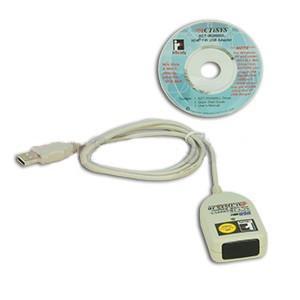
The USB to IrDA adapter ZOLL (ref. 8000-0815) is the manufacturer’s official accessory for establishing the communication link between ZOLL AED Plus and AED Pro defibrillators and a conventional computer. Designed for emergency services, health centres, companies with a defibrillation programme and equipment maintenance departments, this adapter allows you to extract clinical data from each intervention, review the event history and adjust the unit’s configuration without having to open the defibrillator casing or handle internal connectors. An essential accessory for keeping your AED fleet documented, audited and ready for any inspection.
2. Technical explanation of the procedure
The 8000-0815 adapter acts as a wireless communication bridge: it incorporates an IrDA infrared transceiver that connects to a PC’s USB port via its male type A connector. By placing the defibrillator in front of the adapter (infrared window), data is transmitted via an infrared light beam, without having to touch the device or expose its connection pins. It can be used to download post-rescue event records (including the patient’s ECG), self-test data and the device’s internal diagnostics, as well as to update the unit’s configuration using the ZOLL administration application (ref. 8000-0311-01). It is a bidirectional, fast and secure communication, powered directly from the USB port, with no external power sources.
3. Technical Specifications
| Manufacturer | ZOLL Medical Corporation |
| Official manufacturer reference | 8000-0815 (USB IrDA Adapter) |
| Product type | USB to IrDA data adapter / bridge |
| Compatibility | ZOLL AED Plus and ZOLL AED Pro defibrillators |
| Physical interface | USB type A male connector to IrDA transceiver |
| Transfer speed | Up to 12 Mbps; compliant with USB Specification 1.1 and USB IrDA Bridge Device |
| Power supply | Powered by the USB port, no external power sources required |
| Downloadable data | Post-rescue event records (ECG), self-tests and internal diagnostics |
| Software requirement | ZOLL AED Plus Administration Software (ref. 8000-0311-01) |
| Operating systems | Not recommended for Windows 98; verify drivers on current versions of Windows |
| Presentation | 1 unit, includes driver disk for quick integration |
4. Equivalences and Cross-References
The reference 8000-0815 has been verified as the manufacturer’s official code for ZOLL in the official ZOLL store (ZOLL Webstore) and in multiple authorised distributors, so it exactly matches the Cahnos SKU. There is no equivalence table validated by ZOLL that allows this adapter to be replaced by models from other manufacturers: the infrared link and communication protocol are proprietary to ZOLL, so any comparison with generic IrDA adapters should be understood as comparable at category level, not interchangeable 1:1 (protocol, driver and communication firmware differ). The cross-references published by authorised distributors are indicated below, pending official confirmation from the manufacturer.
| Reference | Product | Related items |
| 8000-0815 | USB to IrDA adapter ZOLL (subject of this datasheet) | Officially verified reference |
| 9355-0807 | Cross-reference identifier of the IrDA adapter published by distributors | Cross-reference, pending confirmation from the manufacturer |
| ACT-IR2000-UL / ACT-IR2002UL | OEM IrDA adapter models cited as the basis for the 8000-0815 | Cross-reference, pending confirmation from the manufacturer |
| 8000-0816 | IrDA adapter with RS-232 interface (serial port) for older equipment | Variant of the same family, not interchangeable 1:1 |
| 8000-0311-01 | ZOLL AED Plus Administration Software | Complementary, required for download and configuration |
Note: before using this adapter in tenders or large-volume orders, confirm the cross-reference with the technical department of Cahnos.
5. Selection tips and variants of interest
- If you work with current computer equipment, choose this USB adapter (8000-0815); if your computer only has a serial port, the RS-232 variant (8000-0816) is the one indicated, although it is not interchangeable with this one.
- Check beforehand that the defibrillator has an accessible infrared window and that the PC recognises the adapter before starting the event download.
- For complete management of your fleet, combine this accessory with the ZOLL administration software (8000-0311-01) and keep a documentary record of each download performed.
- Do not use this adapter with very old operating systems (Windows 98 not recommended) and always verify the drivers with the current version of your system.
- For any questions about compatibility with your defibrillator model or about software configuration, consult the technical department of Cahnos before finalising the purchase.
Reviews
There are no reviews yet.